Patta Chitta | Tamil Nadu Land Records – View & Download
Patta Chitta is an official land record document issued by the Government of Tamil Nadu that serves as proof of land ownership. This document combines the Patta (ownership certificate) and Chitta (land details) into a single integrated record maintained by the Revenue Department.
The document contains essential information including owner’s name, patta number, survey number, subdivision number, land area, land classification (wet/dry), district, taluk, village, and tax details. It is crucial for all property-related transactions, loan applications, and legal matters in Tamil Nadu.
What is Patta Chitta?
Patta Chitta is a merged land record document where the Patta portion confirms legal ownership with the registered owner’s name and patta number, while the Chitta portion provides details about the land’s physical characteristics, area, and classification.
This document is maintained by the Village Administrative Officer (VAO) and is essential for establishing property rights, conducting land transactions, and accessing government schemes.
| Aspect | Details |
|---|---|
| Document Name | Patta Chitta (பட்டா சிட்டா) |
| Issued By | Revenue Department, Government of Tamil Nadu |
| Purpose | Legal proof of land ownership |
| Key Information | Owner name, Patta number, Survey number, Land area, Land type, Tax details |
| Maintained By | Village Administrative Officer (VAO) |
| Official Portal | eservices.tn.gov.in |
| Launched | 2015 |
| Department | Commissionerate of Survey and Settlement |
Tamil Nadu e-Services Portal for Land Records
The Government of Tamil Nadu launched the comprehensive e-Services portal to digitize land records and make them accessible to citizens without requiring physical visits to government offices. This portal, managed by the Tamil Nadu e-Governance Agency (TNEGA) in coordination with the Commissionerate of Survey and Settlement, represents a significant step toward transparent governance.
The eservices.tn.gov.in platform allows users to access multiple land-related services including viewing patta chitta online, downloading FMB sketches, checking TSLR extracts for urban properties, and applying for patta transfer online. The digitization initiative began in 2015 and has since made Tamil Nadu one of the leading states in India for digital land record management.
Citizens can now verify patta chitta authenticity, check whether land is classified as government poramboke or private property, and track the status of submitted applications through this single unified platform. The portal supports both English and Tamil languages to ensure accessibility for all residents.
Available Services on TN e-Services Portal
View Patta Chitta Online: Access complete patta chitta records by entering survey number and subdivision details for any land parcel in rural or natham areas.
A-Register Extract: The A-Register is a comprehensive village-level register maintained by the VAO that contains detailed information about all land parcels within a revenue village, including ownership history, land classification changes, and tax assessment details.
FMB Sketch (Field Measurement Book): Download the FMB map showing the exact boundaries, dimensions, and neighboring survey numbers of your land parcel. This sketch is essential for identifying property boundaries and resolving boundary disputes.
TSLR Extract and Sketch: For urban areas falling under town panchayats or municipalities, the Town Survey Land Register (TSLR) serves the same purpose as patta chitta in rural areas. Users can view and download TSLR extract and TSLR sketch online.
Patta Transfer Application: Submit online applications for transferring patta ownership due to sale deed registration, inheritance through legal heir certificate or will, gift deed, partition among family members, or court decree.
Application Status Tracking: Monitor the progress of submitted applications using the unique application reference number provided at the time of submission.
Verify Patta Chitta: Authenticate any patta chitta document by entering its unique reference number to ensure it matches official government records and hasn’t been tampered with.
Poramboke Verification: Check whether a particular survey number is classified as government land (poramboke) or private patta land to avoid fraudulent transactions involving government property.
How to View Patta Chitta Online
Accessing your patta chitta through the Tamil Nadu government’s online portal is straightforward and can be completed in minutes from any location with internet access. The process requires specific land identification details that are typically available on existing land documents or sale deeds.
Step-by-Step Process for Rural and Natham Land
Step 1: Open your web browser and navigate to the official Tamil Nadu e-Services portal at eservices.tn.gov.in. Ensure you are using the correct government website to avoid fraudulent portals.
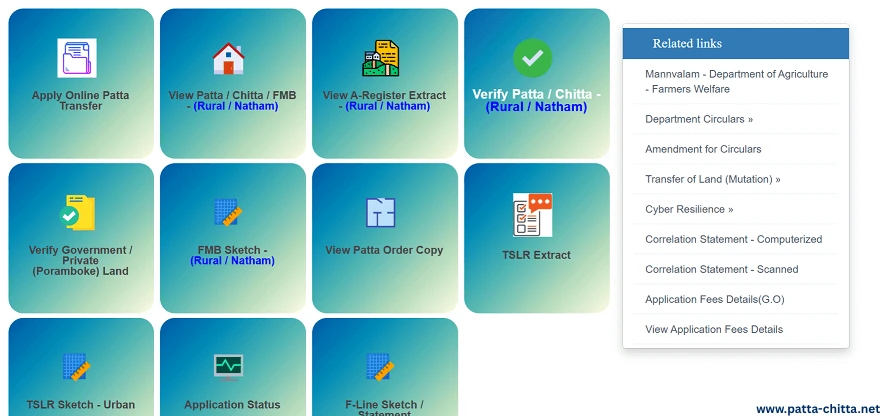
Step 2: On the homepage, locate and click on the option labeled “View Patta / Chitta / FMB” or similar wording. This option may be available under a section titled “Citizen Services” or “Land Records Services.”
Step 3: Select “Rural” or “Natham” as the area type. For village lands and agricultural properties, choose the rural category. Natham refers to specific administrative divisions in some districts.
Step 4: Choose your land’s location by selecting the appropriate District from the dropdown menu, followed by the Taluk, and then the specific Revenue Village where your property is located.
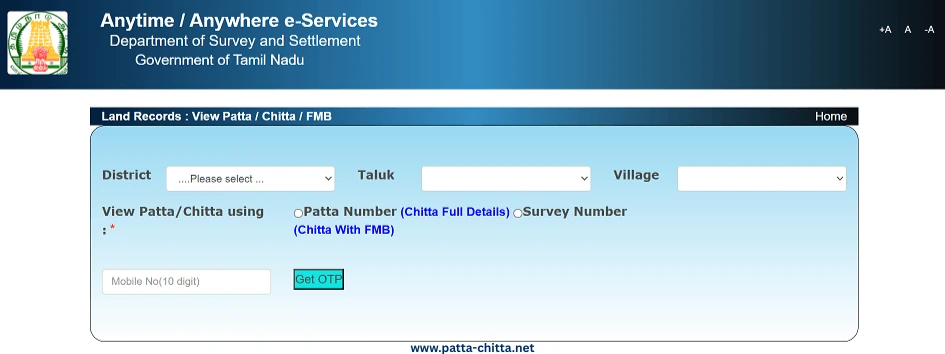
Step 5: Enter the land identification details. You can search using either the Patta Number directly or by entering the Survey Number along with the Subdivision Number. Ensure these numbers match exactly with your land documents.
Step 6: Complete the verification process by entering the displayed captcha code and providing your mobile number. You will receive a One-Time Password (OTP) on the registered mobile number for authentication.
Step 7: After OTP verification, click the submit or view button. The system will retrieve and display your patta chitta details on the screen, showing all ownership and land characteristic information.
Step 8: Review the displayed information carefully. If the details are correct, use the print or download option to save a PDF copy of the patta chitta for your records.
Viewing TSLR Extract for Urban Properties
Urban land parcels require a different approach as they fall under the Town Survey system rather than the rural revenue village system.
Access the TSLR service from the main portal and select your District, followed by the Town or Municipality name. Choose the specific Ward and Block where your property is located. Enter the Town Survey Number and Subdivision Number, then proceed with OTP verification. The TSLR extract will display ownership and land classification details relevant to urban properties.
Patta Chitta Download Process
Once you have successfully viewed your patta chitta online, downloading a copy for offline use or official purposes is simple. The downloaded document serves as a valid reference for most verification purposes, though some institutions may require a certified copy with official stamps.
The download option typically appears as a button or link on the page displaying your land record details. Clicking this button generates a PDF file containing all the information shown on screen, formatted in the official government template. This PDF includes a unique reference number and timestamp indicating when the document was generated from the online database.
Downloaded patta chitta copies are useful for preliminary verification during property purchases, loan application documentation, legal consultations, and personal record-keeping. However, for registration purposes or court submissions, you may need to obtain a certified copy by paying the prescribed fee at the Taluk office or through authorized common service centers.
How to Apply for Patta Transfer Online
Transferring patta ownership is necessary when land changes hands through sale, inheritance, gift, partition, or other legal means. The Tamil Nadu e-Services portal allows online submission of patta transfer applications, significantly reducing the time and effort previously required for this process.
Documents Required for Patta Transfer
The specific documents needed vary depending on the nature of the transfer, but commonly required documents include:
For Sale Transactions: Registered sale deed, previous patta copy, encumbrance certificate showing clear title, property tax receipts, possession certificate, and identity proofs of both buyer and seller including Aadhaar card and voter ID.
For Inheritance Cases: Death certificate of the deceased owner, legal heir certificate or succession certificate issued by competent authority, will document (if applicable), consent letters from all legal heirs, family tree or pedigree chart, and identity proofs of all claimants.
For Gift Deed Transfer: Registered gift deed, consent of the donor, relationship proof between donor and donee, original patta, and identity proofs of both parties.
For Partition Cases: Partition deed registered with sub-registrar, consent of all co-owners, family settlement agreement, FMB sketch showing the subdivided portions, and identity proofs of all parties involved.
Online Application Submission Process
Visit the TN e-Services portal and locate the “Apply Patta Transfer” option under citizen services. Login using your credentials or register as a new user if you haven’t created an account previously. The registration process requires basic personal information and mobile number verification.
Fill in the comprehensive application form providing accurate details about the current owner, the applicant seeking patta transfer, the property’s complete location details including district, taluk, village, survey number, and subdivision number, along with the reason for transfer such as sale, inheritance, gift, or partition.
Upload scanned copies of all required supporting documents in the specified formats, typically PDF or JPEG with size limitations mentioned on the portal. Ensure all documents are clearly legible and contain complete information to avoid rejection or requests for resubmission.
Pay the applicable processing fee through the online payment gateway. The fee structure varies based on the type of transfer and whether subdivision is involved. For non-subdivisional transfers, the fee is typically Rs. 60, while transfers involving land subdivision attract additional charges of Rs. 400 per subdivision.
After successful payment, review all entered information and uploaded documents carefully before final submission. Once submitted, the system generates a unique Application ID which must be saved for future reference and status tracking.
Checking Patta Chitta Application Status
After submitting an online patta transfer application or any other service request through the portal, tracking its progress is essential to stay informed about the processing stage and expected completion timeline.
Access the “Application Status” or “Track Application” service on the e-Services portal homepage. Enter the Application ID or Reference Number provided at the time of submission along with other verification details such as your registered mobile number or applicant name.
The status display shows the current stage of processing, which may include stages like application received, under scrutiny by VAO, field verification in progress, recommended by VAO, pending approval at Taluk level, or approved and ready for collection. If any deficiencies or clarifications are required, the status will indicate what additional information or documents need to be submitted.
Processing time varies depending on the complexity of the case, workload at the local revenue office, and whether field verification is required. Simple patta transfers without disputes typically take 30 to 90 days for completion, while cases involving subdivisions or legal complications may take longer.
Verifying Patta Chitta Authenticity
With the increase in property fraud cases, verifying the authenticity of patta chitta documents has become crucial before entering into any land transaction. The Tamil Nadu government provides an online verification service to help buyers and financial institutions confirm that a patta chitta document is genuine and matches official records.
To verify patta chitta, access the “Verify Patta / Chitta” service on the e-Services portal. You will need the unique Reference Number printed on the patta chitta document being verified. This reference number is generated when documents are downloaded or issued online and serves as a unique identifier in the government database.
Enter the reference number in the verification portal along with your mobile number for OTP-based authentication. Upon successful verification, the system displays whether the document matches official records and shows the date when it was generated. If the reference number doesn’t exist in the database or the details don’t match, the document may be fraudulent.
This verification step is particularly important when purchasing land from unknown sellers, when obtaining older patta chitta copies from sellers, or when banks and financial institutions need to confirm land ownership before sanctioning loans against property.
FMB Sketch and Its Importance
The Field Measurement Book (FMB) is a critical cadastral document that contains detailed measurements, boundaries, and spatial relationships of land parcels within a survey village. The FMB sketch provides a visual representation of your land showing its exact location, dimensions, and neighboring survey numbers.
Understanding the FMB sketch is essential for identifying the physical boundaries of your property on the ground. The sketch shows the survey number, subdivision lines if applicable, the bearing and distance of each boundary, neighboring survey numbers on all sides, nearby landmarks such as roads, water bodies, or public facilities, and the calculated area based on field measurements.
How to Access FMB Sketch Online
Navigate to the Tamil Nadu e-Services portal and select the option to view FMB or “View Patta & FMB / Chitta.” Choose whether your land is in a rural or urban area, then select the district, taluk, and village. Enter your survey number and subdivision number, complete the captcha and OTP verification, and the FMB sketch will be displayed along with measurement details.
The FMB sketch is particularly valuable when there are boundary disputes with neighbors, when planning construction and needing to verify setback distances, when subdividing land and requiring accurate demarcation, or during property survey before purchase to confirm actual boundaries match the documented area.
In cases where the online FMB is outdated or unclear, you may need to request a field survey by revenue officials or hire licensed surveyors to prepare an updated survey plan that can be cross-referenced with the FMB records.
A-Register Extract: Understanding Land History
The A-Register is a village-level revenue record maintained by the Village Administrative Officer that serves as the master register for all land parcels within a revenue village. This register contains comprehensive historical information about each survey number including all changes in ownership, subdivision details over time, and modifications in land classification.
The A-Register extract shows the chronological history of a land parcel, making it valuable for conducting due diligence before property purchase. It helps identify any gaps in the ownership chain, whether the land has been subdivided multiple times which might indicate potential issues, changes in land use classification from agricultural to residential or commercial, and the continuity of ownership through different transactions.
To view the A-Register extract online, access the relevant service on the e-Services portal, select your district, taluk, and village, enter the survey number and subdivision, and download the extract showing historical records. This document complements the patta chitta by providing context about how the current ownership situation evolved over time.
Importance and Benefits of Patta Chitta
Patta Chitta serves as the foundation for all land-related activities in Tamil Nadu and provides numerous benefits to property owners and prospective buyers.
Legal Ownership Proof: Patta Chitta is recognized by courts, government departments, and all legal entities as valid proof of land ownership. In property disputes, the person whose name appears in the patta is presumed to be the rightful owner unless proven otherwise.
Essential for Property Transactions: No property sale or purchase can be legally completed without proper patta documents. Sub-registrar offices require patta chitta verification before registering sale deeds, gift deeds, or other transfer instruments.
Bank Loan Eligibility: All banks and financial institutions mandate patta chitta verification before sanctioning home loans, agriculture loans, or loans against property. The document helps banks assess the property value, confirm clear title, and establish the borrower’s ownership rights.
Government Scheme Benefits: Many government welfare schemes for farmers, housing schemes, and agricultural subsidies require valid patta documents for eligibility verification. Without updated patta records, landowners cannot access various government benefits.
Property Tax Assessment: Municipal bodies and panchayats use patta chitta information to calculate property tax, vacant land tax, and other levies. Regular tax payments linked to your patta number help maintain good standing with revenue authorities.
Resolution of Disputes: When boundary disputes arise with neighbors or when ownership is contested, patta chitta along with FMB sketch serves as primary evidence in revenue courts and civil courts for adjudication.
Agricultural Benefits: Farmers need patta documents to access crop insurance schemes, apply for agricultural implements subsidies, get soil health cards, and obtain other agriculture-related benefits from government departments.
Common Issues and Solutions
Survey Number Not Found: If your survey number doesn’t appear in the online database, it may indicate that the records haven’t been fully digitized for your village. Visit the VAO office or Taluk office with your existing land documents for manual verification and request digitization.
Name Mismatch in Patta: If the patta shows a different owner name than expected, it could be due to pending patta transfer from a previous transaction. File for patta transfer immediately with supporting documents like registered sale deed to update the ownership.
Subdivision Not Reflected: When land has been subdivided but the patta still shows the original undivided survey number, apply for patta subdivision through the online portal or at the Taluk office with the approved subdivision sketch from the survey department.
Land Shown as Poramboke: If your private land appears classified as government poramboke, this requires immediate rectification. Gather all historical documents proving private ownership and file a complaint with the Tahsildar for reclassification.
FMB Sketch Discrepancy: When the physical boundaries of your land don’t match the FMB sketch, request a field survey from the revenue department. A licensed surveyor can prepare a new survey plan that can be submitted for FMB correction.
Duplicate Patta Claims: In cases where multiple parties claim ownership over the same land, legal adjudication becomes necessary. Consult a property lawyer and be prepared to produce documentary evidence including previous sale deeds, tax payment receipts, and possession proof.
Fees and Charges
| Service | Fee Details |
|---|---|
| View Patta Chitta Online | Free of charge |
| Download Patta Chitta Extract | Free of charge |
| View FMB Sketch | Free of charge |
| Download FMB Sketch | Free of charge |
| View A-Register Extract | Free of charge |
| View TSLR Extract | Free of charge |
| Patta Transfer (No Subdivision) | Rs. 60 processing fee |
| Patta Transfer (With Subdivision) | Rs. 60 + Rs. 400 per subdivision |
| Certified Copy of Land Documents (Rural) | Rs. 400 + Rs. 200 per additional page |
| Certified Copy (Municipality Area) | Rs. 500 per document |
| Certified Copy (Corporation Area) | Rs. 600 per document |
| Common Service Center Charges | Rs. 25 to Rs. 60 additional service charge |
Contact Information
| Detail | Information |
|---|---|
| Department | Commissionerate of Survey and Settlement |
| Address | No. 1, Survey House, Kamarajar Salai, Chepauk, Chennai – 600005 |
| dir-sur@nic.in | |
| Helpline Number | 1100 (Toll-free) |
| Official Portal | eservices.tn.gov.in |
| Portal Managed By | Tamil Nadu e-Governance Agency (TNEGA) |